Fireflies.ai Review 2026: Pricing, Accuracy, What Held Up
Marvin reviewed Fireflies.ai's recording, transcription, and AI summary features, testing accuracy across noisy meetings and weighing its pricing tiers.


When a client moves a deadline on a call, I need that exact sentence later, plus enough context to explain it to the team.
Fireflies.ai is built for that search. It records and transcribes calls, creates summaries, and helps you find specific moments later.
In this Fireflies.ai review, I'll look at how useful those notes are in practice, what the plans cost, and where I'd be careful with privacy.
Is Fireflies worth it?
Yes, if your main goal is capturing meetings and searching them later. In my 24 meetings, the transcript gave me a useful route back to specific remarks on calls with clear audio and a few speakers. It suits teams that want a searchable record of decisions, plus notes they can send into tools like Slack, HubSpot, or Salesforce.
Skip it, or test it first, if you need a word-for-word record of calls full of crosstalk or strong accents. I had to check the recording on those. It's also a weaker fit if you mainly want answers pulled from many older calls: AskFred handled one meeting well but took more back-and-forth across several.
What is Fireflies AI used for?
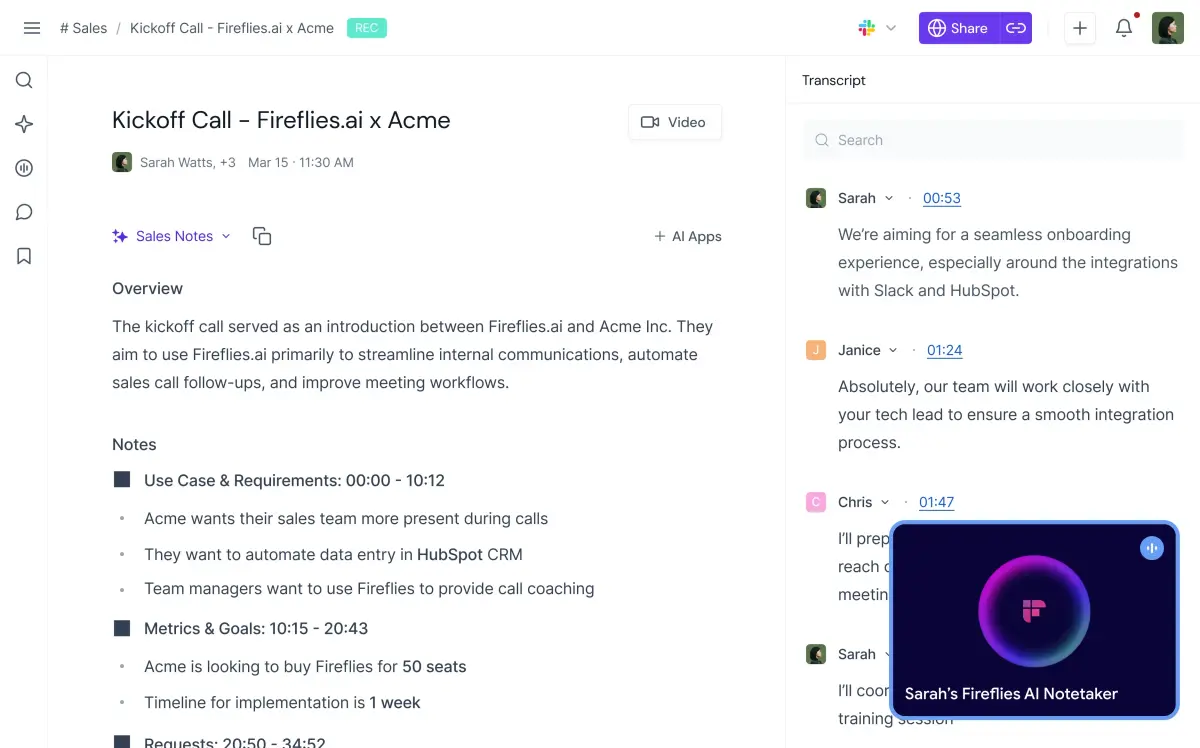
Fireflies AI is used to record meetings, transcribe conversations, summarize decisions, and find details later. Invite its notetaker to a Zoom, Google Meet, Teams, or Webex call, or set it to join eligible calendar meetings.
You can also capture conversations through its mobile and desktop apps.
After a call, you get a transcript, an overview, and action items. Search can take you back to the sentence where a decision was made. It helps when your notes say “send the new proposal,” and you need to remember what changed.
Fireflies can also send meeting information to tools such as Slack, HubSpot, and Salesforce. Its Personal Assistant adds daily digests and meeting prep, while its Email Assistant can triage Gmail and Outlook messages and draft replies.
How I tested Fireflies AI and what I found
I used Fireflies AI in 24 meetings over three weeks, including one-on-ones, group calls, and conversations with speakers who had different accents. I paid closest attention to whether the transcript and summary captured decisions I could safely use in a follow-up.
On calls with clear audio and a few speakers, the transcript gave me a useful route back to specific remarks. The rougher moments came when people spoke over one another or a regional accent confused a few lines.
I checked the recording before repeating a name, deadline, or commitment to someone else.
Fireflies transcribes in 100+ languages. The company claims 99% accuracy in English and 95% in other languages. In my calls, that held up until people talked over each other.
AskFred, Fireflies' AI assistant for questions about your recorded calls, was most useful when I asked about a specific meeting, such as what we agreed to change in a proposal. Pulling a pattern from several older calls took more back-and-forth. I still wanted to open the source conversation before treating its answer as settled.
Which Fireflies AI features matter day to day?
- Meeting capture and search do most of the work for me. Fireflies can join a call through calendar rules or a direct invitation, identify speakers, and create a timestamped transcript. Its mobile app also captures in-person conversations.
- Summaries and AskFred help with the first pass after a call. The summary pulls out action items; AskFred answers questions about recorded conversations. Check the transcript when two people discuss the same task.
- Personal Assistant and Email Assistant extend Fireflies beyond notes. A morning digest can bring together meetings, email, and Slack. The email tool drafts replies for review in Gmail or Outlook. These features matter if your post-meeting work tends to land in your inbox.
- Integrations and AI Skills turn conversation details into outputs. Fireflies can send notes to a CRM or project tool, while its AI Skills can pull structured information from a transcript. A sales team, for example, might want the agreed next step in the right deal record.
- Voice Agents and conversation analytics serve more specific needs. Fireflies' Voice Agents can handle tasks such as candidate screening or lead qualification. Business includes conversation intelligence and team analytics.
I would try the basic meeting workflow first, then check whether the extra features solve a job my team does often.
If you're choosing a dedicated notes app, our meeting minutes app comparison puts these features beside other ways to capture a call.
Is Fireflies AI safe?
Fireflies publishes SOC 2 Type II and GDPR security claims, plus controls for recording and access. The company says customers own their data and that it doesn't use meeting content to train AI models.
The settings deserve as much attention as the badges. Fireflies lets you choose whether its bot joins all eligible calls or only meetings where you invite it. Meeting privacy ranges from only you to teammates plus anyone with the link, and that wider setting is the default.
Before a client call, I'd check both the join rule and who can open the resulting notes.
HIPAA use needs additional setup. Fireflies says it requires an Enterprise plan, private storage, and a signed Business Associate Agreement (BAA). A team handling protected health information should confirm those conditions before recording.
Fireflies AI pricing and plans
Fireflies AI starts at $18/seat/month for Pro with monthly billing. Fireflies’ current plans also include a free tier and lower monthly rates when you commit to annual billing. Enterprise is billed annually only.
Fireflies AI credits and add-on costs
Standard meeting transcription and recaps don't use AI credits. Advanced actions such as AI Skills, Voice Agents, and CRM autofill do, and so do Personal Assistant's Daily Digest and Meeting Prep, which Fireflies says are on by default until an admin turns them off. Each plan starts with a one-time balance: 20 credits on Free and Pro, 30 on Business, and 50 on Enterprise.
Paid plans can buy more, starting at $5/month for 50 credits, and purchased credits don't carry over to the next billing cycle. Our Fireflies pricing breakdown lists every credit package and which features use credits.
{{templates}}
What user reviews say about Fireflies AI
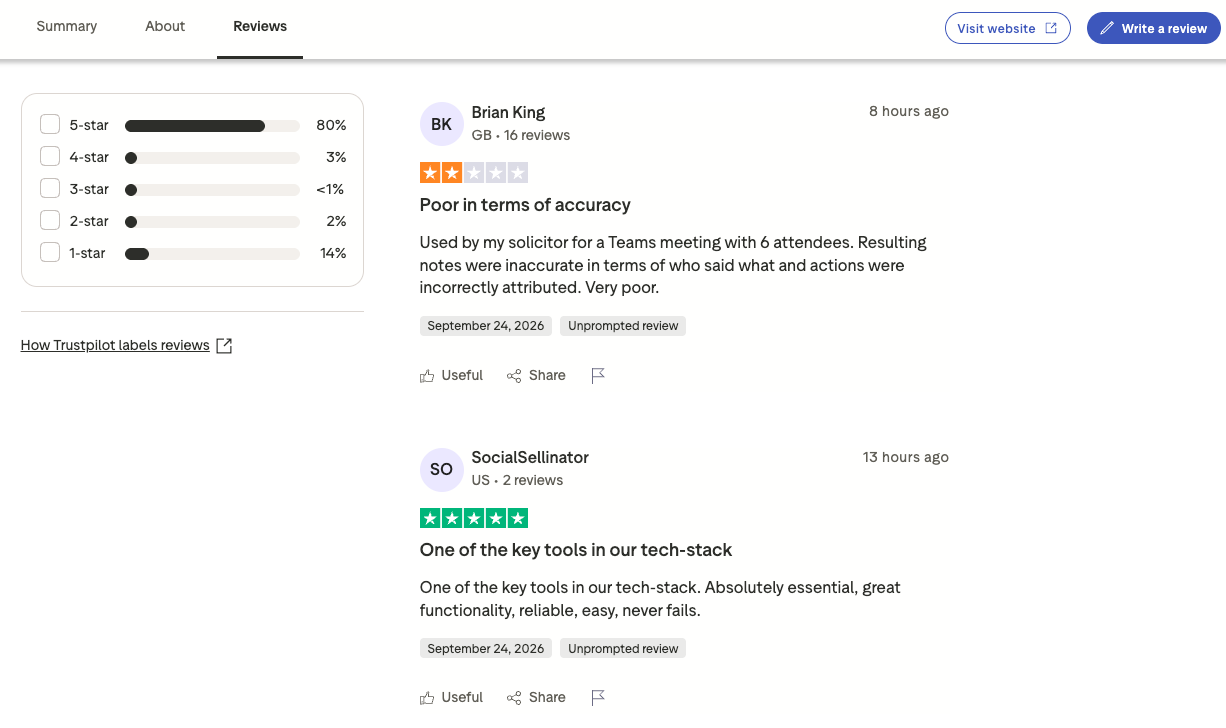
Fireflies' Trustpilot page showed a 4.5/5 TrustScore from 800+ reviews. Reviews are personal experiences, so I looked at the complaints alongside the praise.
- Pro: “One of the key tools in our tech-stack. Absolutely essential, great functionality, reliable, easy, never fails.” - SocialSellinator, Trustpilot review
- Con: “Used by my solicitor for a Teams meeting with 6 attendees. Resulting notes were inaccurate in terms of who said what and actions were incorrectly attributed. Very poor.” - Brian King, Trustpilot review
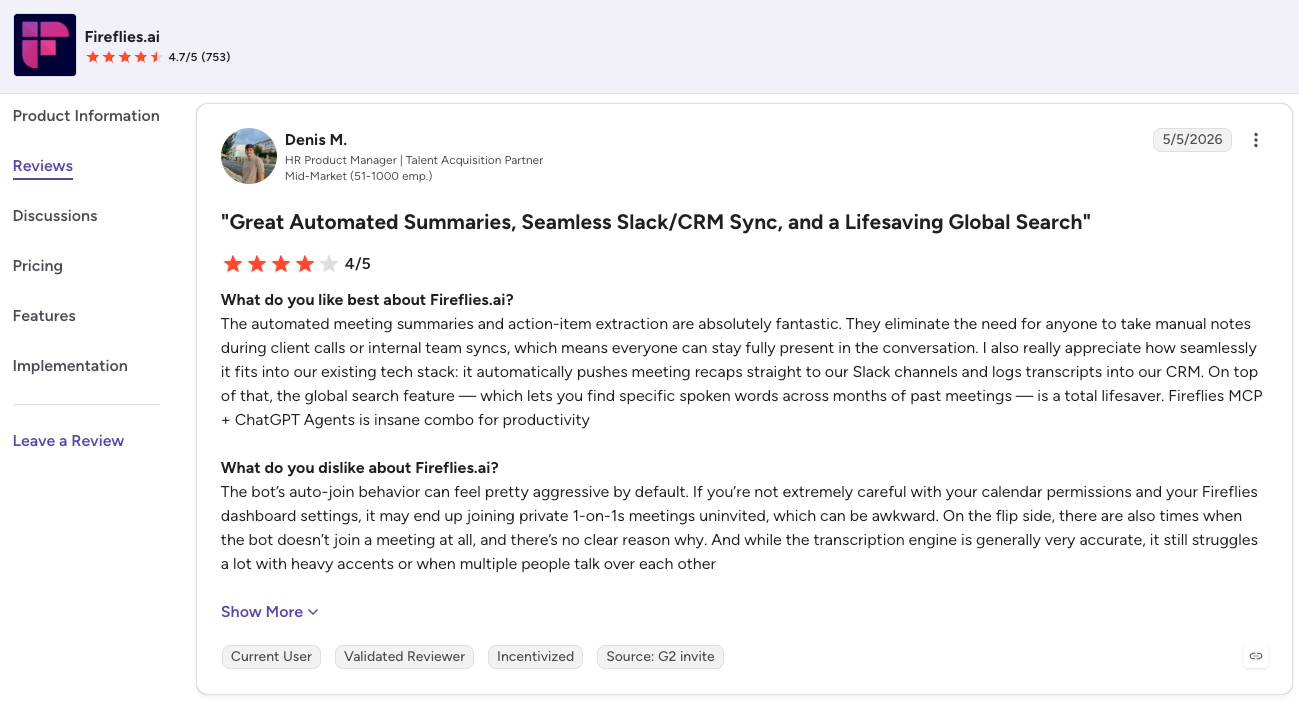
Fireflies.ai’s G2 profile showed 4.7/5 from 753 reviews. Reviewers praise the searchable transcripts and summaries for helping them revisit decisions, while some report transcription errors and speakers being mislabeled.
- Pro: “The automated meeting summaries and action-item extraction are absolutely fantastic. They eliminate the need for anyone to take manual notes during client calls or internal team syncs, which means everyone can stay fully present in the conversation.” - Denis M., G2 review
- Con: “The bot’s auto-join behavior can feel pretty aggressive by default. If you’re not extremely careful with your calendar permissions and your Fireflies dashboard settings, it may end up joining private 1-on-1s meetings uninvited, which can be awkward.” - Denis M., G2 review
Fireflies vs Copilot and Otter
Fireflies records calls across Zoom, Google Meet, and Teams, then lets you search what was said and use meeting details in follow-up work. The AI note-taking apps comparison puts its meeting features alongside other tools.
Microsoft Copilot in Teams is worth checking if your meetings already happen there. Intelligent recap requires Teams Premium or a Microsoft 365 Copilot license, so I'd check what my team has before paying for another tool.
Otter is another choice for meeting notes across Zoom, Google Meet, and Teams. Its live transcript and slide capture would matter to me if I wanted to follow along during a call. The Otter alternatives roundup helps compare that workflow with other options.
For more options, our Fireflies alternatives roundup compares other meeting note tools.
Fireflies vs Lindy
Fireflies is where I’d look for the moment a client agreed to change a deadline. Lindy is the teammate I’d ask in Slack what came up across several client calls and connected files, with sources I can check. I could then ask it to prepare a brief for the team.
I’d test each on a task my team already does. Finding one decision in a call would tell me plenty about Fireflies. Asking a question across several sources, then preparing the next piece of work, would tell me more about Lindy.
{{cta}}
Should you use Fireflies? My take
Fireflies is a solid choice if your main goal is capturing meetings accurately and building a searchable record your team can reference later. The transcription quality and 100+ language support back that up.
Fireflies can also prepare follow-ups and update connected records after a call. I'd still read the draft and check the deal stage, especially before making that workflow routine. Advanced actions can add credit costs.
FAQs
1. Is Fireflies AI any good?
Fireflies AI is useful for recording, transcribing, and searching meetings, especially when your team needs a record of past decisions. The quality of a transcript can vary with audio and overlapping speakers. Check a few calls from your own calendar before relying on summaries for client commitments.
2. Is Fireflies AI completely free?
No, but Fireflies has a free plan you can keep using. It includes eligible meeting transcription, limited AI summaries, 400 minutes of storage, and 20 included AI credits. More storage, unlimited summaries, and some advanced capabilities require a paid plan, and some also use AI credits.
3. How much does Fireflies AI cost per month?
Pro starts at $18/seat/month on monthly billing. Business costs $29/seat/month on the same basis. Annual billing reduces those monthly rates to $10 and $19 per seat, respectively. Enterprise is $39/seat/month, billed annually only. Advanced AI credit packages can add to the bill.
4. Is Fireflies AI safe to use at work?
Fireflies can be safe at work if you set it up carefully. It provides security controls and says it does not train models on customer meetings. Check auto-join, recording, and sharing settings before connecting a work calendar. HIPAA use requires its Enterprise setup, private storage, and a signed Business Associate Agreement.
5. What is Fireflies AI used for?
Fireflies is used to record, transcribe, and summarize meetings on Zoom, Google Meet, Teams, and Webex, then make those conversations searchable. Teams also use it to sync action items into tools like Slack, Salesforce, or HubSpot without manual entry.










