


iMessage API: Three Rewrites, One Apple Ban, and What Actually Works

How We Built iMessage Into Lindy
Built by Ethan Behrends, Jérémy Mathon, and Ali Abassi.
Somewhere in a data center rack in Las Vegas, there's a Mac Mini that used to be the entire iMessage infrastructure for Lindy.ai. It had a paired iPhone. It had an Apple account. It was running a Swift daemon that monitored a SQLite database and injected messages through Private Frameworks in ways Apple definitely didn't intend. We built it. We rewrote it. Then we deleted everything and replaced it with an API call. Three complete rewrites in one month. This is the story of all three being the right call.
Why iMessage is unlike every other channel
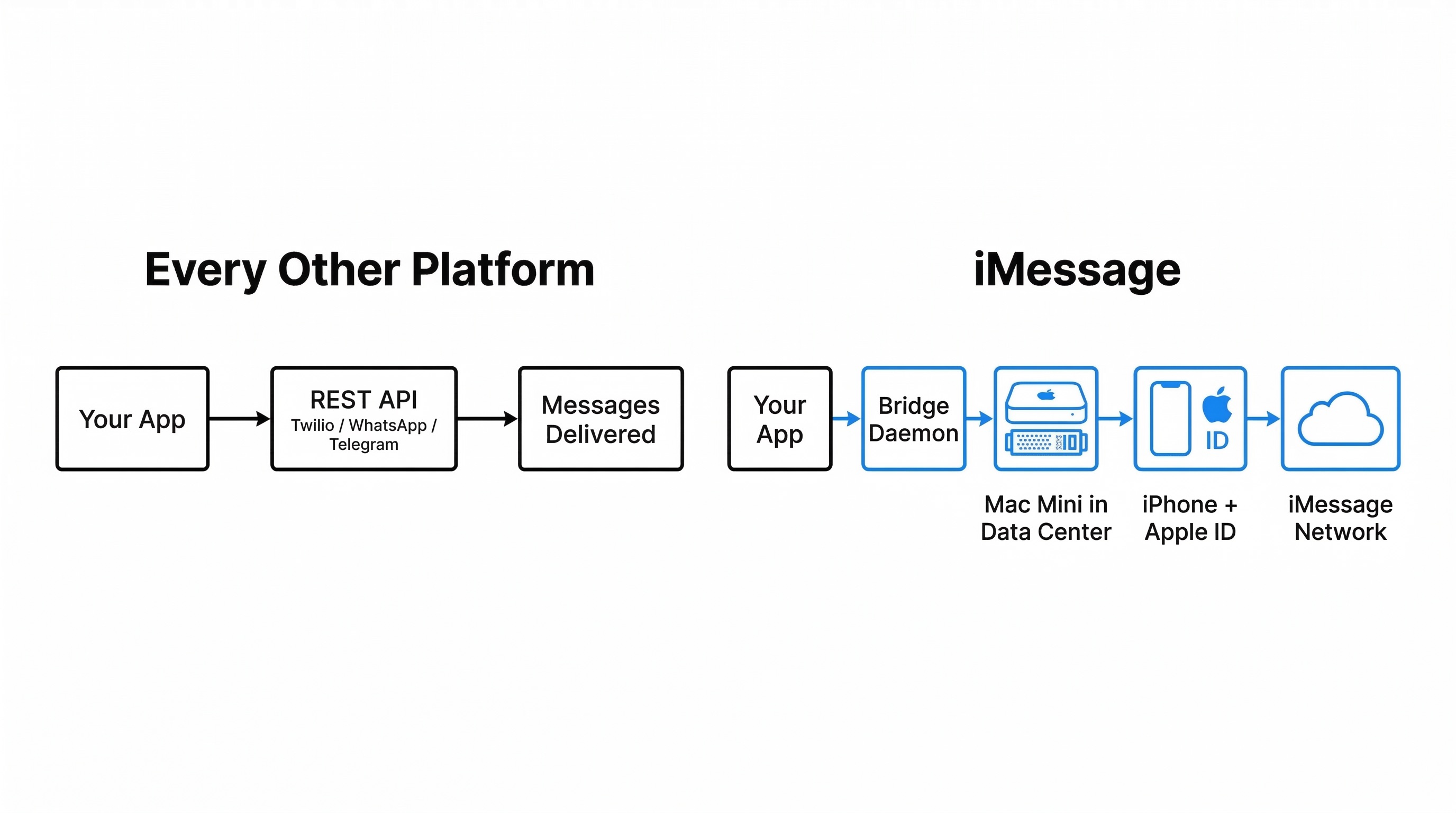
To send a text message programmatically, you call Twilio's REST API. To send a WhatsApp message, you call Meta's Business API. Telegram, same thing. These are platforms that want developers building on them. They publish docs, hand out API keys, and charge you per message.
Apple does none of this. There is no iMessage Business API. There is no developer program for Messages. If you want to send an iMessage programmatically, you need:
- A physical Mac (or a Mac in a data center)
- A physical iPhone paired to that Mac
- An Apple ID signed into Messages.app on the Mac
- A daemon that watches the Messages database for incoming messages and injects outgoing ones through undocumented frameworks
That's the starting line. Every company building iMessage integrations starts from the same absurd position.
The first bridge: a Swift daemon
In late December 2025, the team wrote an RFC for iMessage integration at Lindy. The architecture: a Swift daemon running on a Mac Mini in a data center, monitoring Messages.app's SQLite write-ahead log (chat.db-wal) for incoming messages. For sending, it used Apple's Private Frameworks to inject messages directly into Messages.app internals, guaranteeing blue bubbles. AppleScript was the fallback.
The bridge worked. It could send and receive iMessages, handle attachments, and relay everything back to Lindy's API via webhooks. The code was clean. The documentation was thorough.
But only one engineer on the team knew Swift. An iMessage bridge runs on physical hardware in a data center. When it breaks at 2am, somebody needs to SSH into a Mac Mini and debug a Swift process watching SQLite WAL files. If only one person can do that, that's a scaling problem on the team, not just the infrastructure.
The health check endpoint tells the story:
const iMessageBridgeHealthSchema = z.object({
    bridgeId: z.string(),
    status: z.enum(['healthy', 'unhealthy']),
    messagesAppRunning: z.boolean(),
    lastMessageSentAt: z.number().optional(),
    pendingCommands: z.number(),
    uptime: z.number(), // seconds
})
messagesAppRunning: z.boolean(). We were literally checking whether Messages.app was still running on a Mac in a data center.
The team started researching what competitors were doing. OpenClaw and others were using an open-source library called BlueBubbles, a JavaScript-based engine for controlling iMessage. The entire team could read and debug JavaScript.
The BlueBubbles bet
The migration to BlueBubbles replaced the custom Swift daemon with a JavaScript-based engine running on the same hardware. Same Mac Mini, same iPhone, same Apple ID. But now the bridge code was in a language the whole team could maintain.
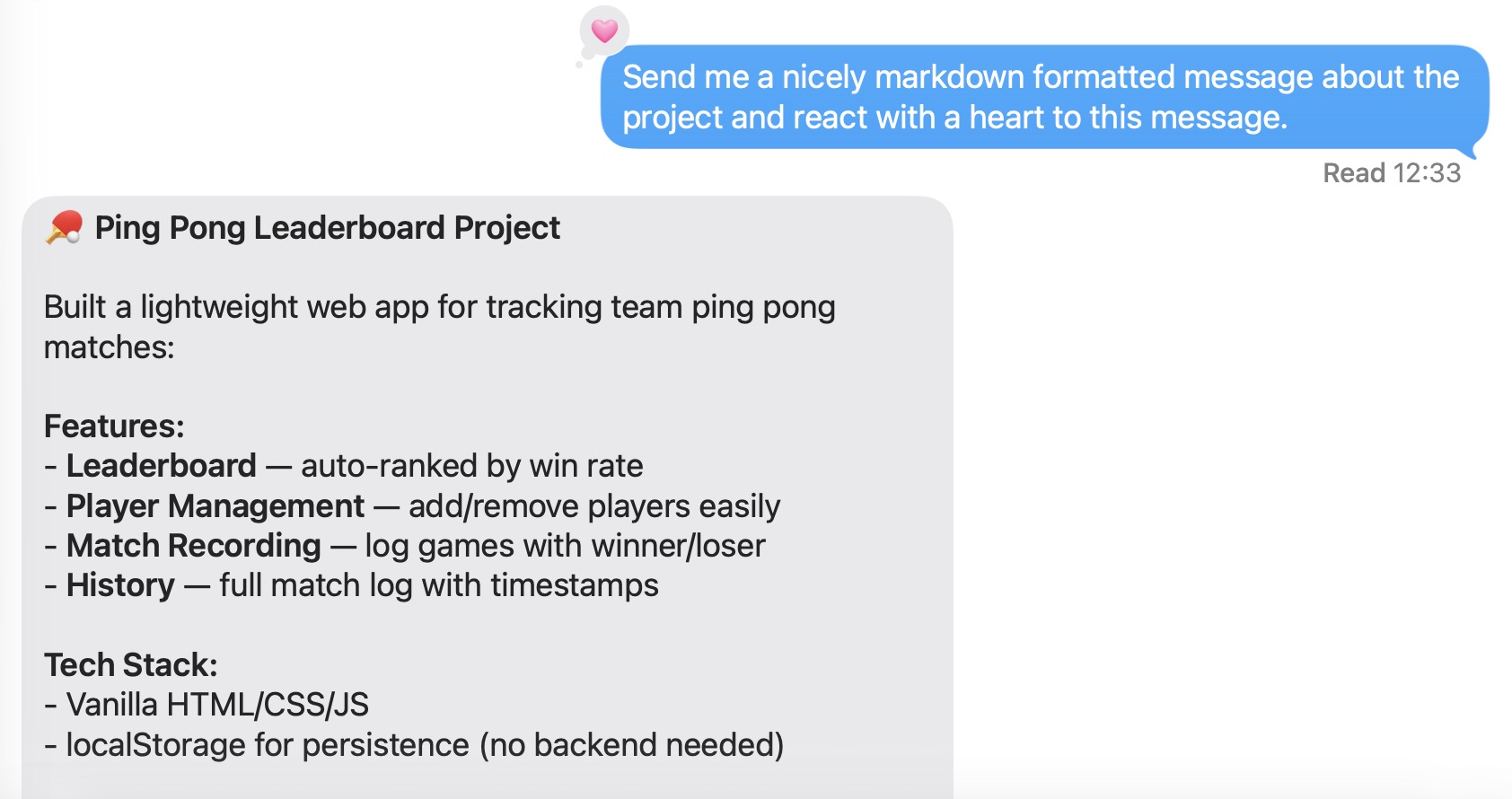
The migration unlocked features fast. Within a few weeks, the team had reactions and tapbacks working, plus markdown formatting support (bold, italic, strikethrough) via a custom BlueBubbles build. Edit and unsend support followed shortly after.
But the real product work was making iMessage feel like a full messaging platform, not a text-only pipe. We treated iMessage as a first-class channel, which meant supporting everything a user would expect from a native conversation:
Voice memos work in both directions. If you send a voice memo to your Lindy agent, it gets transcribed and fed to the agent as text. If you ask the agent to send you a voice memo (a summary of your morning while you're driving, for example), it generates audio via ElevenLabs and sends it back as an iMessage voice memo.
Reactions work both ways too. You can react to a message from your agent (thumbs up, heart, whatever) and it fires the agent, which is useful for quick confirmations. The agent can react to your messages for lightweight feedback without sending a full reply.
Images are where it gets interesting. Send your agent a photo and the multimodal LLM processes it directly. The agent can also send images back: if it pulls a chart from an email attachment, or generates something you asked for, it comes through as a native iMessage image. Every image gets stored in our infrastructure so the agent can reference it later. You can send a photo of your weekend plans on Saturday and ask about it on Tuesday. The agent still has access to it.
The hardware constraint remained, though. Each iMessage number required its own Mac Mini, its own iPhone, and its own Apple account. The team considered what competitors do: multiple numbers with round-robin assignment, sharing contact cards so users don't notice when messages come from different numbers. The math didn't work. One number meant one Mac Mini, one iPhone, one Apple account. Scaling to ten numbers meant ten of everything. We shipped with a single number.
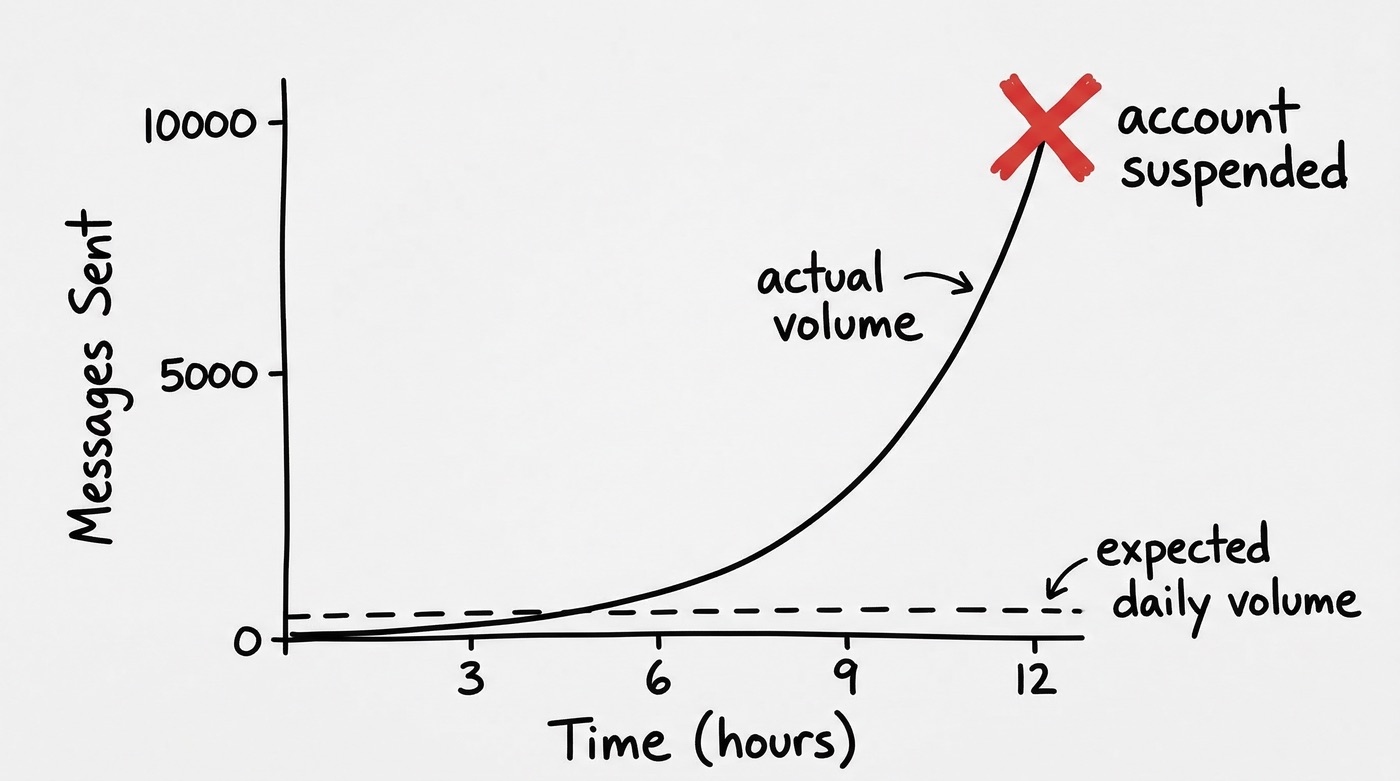
The capacity estimate in the RFC was 100 to 500 messages per hour per Apple ID. The team expected a few hundred messages per day.
The ban
On launch day, iMessage volume blew past every estimate we had. Way more messages than we'd planned for, way faster than we'd expected.
The feature worked exactly as intended. Users found iMessage, tried it, and kept using it. An AI assistant you can text like a colleague is the kind of thing people use a lot.
Apple's spam detection is a black box. There are no published rate limits for iMessage, no documentation on what triggers a ban, and no appeals process. A new account, high volume, low recipient diversity, and a lopsided send-to-receive ratio all contribute. The same behavior pattern that looks like a successful AI assistant launch looks identical to a spam operation from Apple's perspective.
The account was permanently banned. Half a day of iMessage capability, then nothing.
The bridge code was solid. BlueBubbles was handling the load. The feature was clearly something users wanted. Apple's undocumented spam thresholds had caught us, and no amount of bridge engineering would change that.
The obvious next step (buy a new iPhone, set up a new Apple ID, provision a new Mac Mini) would take days, cost more money, and solve nothing. The next account would get banned too, just slower.
The rebuild: one API call
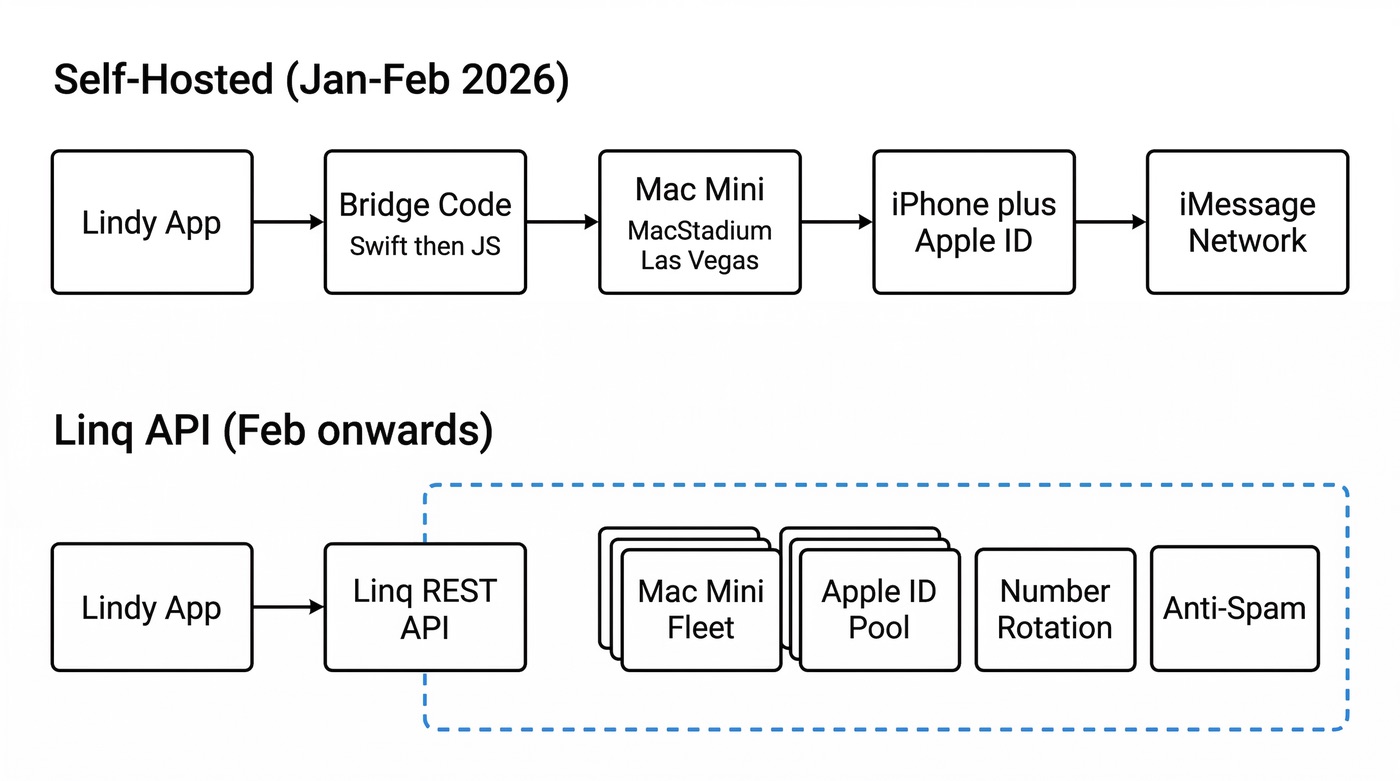
While the team was figuring out next steps, one of our engineers got contacted by a company called Linq. Linq is a managed iMessage bridge service. They handle the hard part (the Mac Minis, the iPhones, the Apple IDs, the number rotation, the anti-spam strategies) and expose a REST API. You call their API, get phone numbers, send messages, receive webhooks. The same developer experience as Twilio or WhatsApp, except for iMessage.
The rebuild took four hours, using Claude Code to accelerate the rewrite. The team had already built the iMessage integration twice. They understood the message routing, the webhook handling, the attachment processing. What changed was they stopped owning the hardware layer.
The new message sending code:
try {
    return await trySendViaLinq(actor, identity, phoneNumber, message, attachments)
} catch (error) {
    logger.info('Linq send failed, falling back to SMS', { error })
}
return await sendViaSMS(actor, identity, phoneNumber, message)
Try Linq, fall back to SMS. That's it.
Within a few days, the team had completed the full migration: read receipts, attachments, voice memos, reply-to threading, contact card generation, and a new onboarding flow where users text the system first (so Apple sees reciprocal conversations, not one-way blasts).
The old bridge code was deleted in a cleanup PR: 76 files changed, thousands of lines removed. The automated PR reviewer gave it a 9/10 and added: "It's mostly deletions, which is the best kind of code."
A second cleanup removed the apps/imessage-bridge directory entirely. The reviewer comment: "It's a deletion. You can't really mess that up, but you also can't really do it with any particular flair. Perfectly cromulent."
Making it feel like texting a person
With the infrastructure stable on Linq, the problem shifted. The iMessage channel worked. Messages went in and out reliably. But "working" and "feeling right" are different things. A few rough edges made the experience feel like talking to a system instead of texting a colleague.
The typing bubble
You text your Lindy agent asking it to check your calendar for the week. The agent needs to fetch all your events, filter them, maybe cross-reference a few things. That takes a minute or two. From your side, all you see is a read receipt, then silence. After thirty seconds you're wondering if it's broken. After a minute you're texting "hello?" and "are you alive?"
The agent was working fine. It was mid-execution, pulling events and filtering results.
The fix was the typing indicator, the three bouncing dots you see when someone is composing a message. When the agent starts processing, we show the typing bubble. It stays active until the first response message is sent. If the typing indicator disappears and no message arrives, something actually went wrong. If it's still bouncing, sit tight.
The obvious alternative was to send a status message: "Working on it!" or "Checking your calendar..." We didn't do that, and the reason ties back to the ban. Apple's spam detection looks at message ratios. The rough rule is something like ten outbound messages per inbound message before you start looking like a spammer. Every "still processing..." message eats into that budget. If the agent sends three status updates before the actual answer, that's four messages for one user query. The typing indicator costs zero messages. It's a free signal. The user gets feedback, and our send/receive ratio stays clean.
The debounce problem
The other rough edge: rapid-fire messages. People text the way they talk. You send "hey" and hit enter. Then "what's my day look like?" and hit enter. Then "also what's the weather in SF?" and hit enter.
Without debouncing, the agent receives three separate messages and kicks off three separate processing runs. You get three separate replies, one answering "hey," one about your calendar, one about weather. The agent is confused too, because by the time it's answering "hey," two more messages have arrived that it doesn't know about yet.
The fix is a three-second debounce window. When a message arrives, we wait three seconds. If another message comes in during that window, we reset the timer. Once three seconds pass with no new messages, we bundle everything and send it to the agent as one request. "Hey, what's my day look like, also what's the weather in SF?" One message, one response.
Why three seconds? Any longer and a single-message user sits there watching nothing happen, assuming it's broken. Any shorter and you miss the second message in a two-message burst. Three seconds is the tradeoff.
We built this on Temporal. Each incoming message sends a signal to a Temporal workflow that holds state and waits for silence before dispatching. Temporal over something like Redis because we can retry failed dispatches, inspect workflow state when debugging, and the whole thing is durable by default.
This actually worked on the original bridge. We lost it during the Linq migration and are rebuilding it now. It's one of those features where you don't notice it when it's there, but you definitely notice when it's gone.
What's still unsolved
Three architectures, each correct for its moment. The Swift daemon was the right first move when no iMessage API existed. BlueBubbles was the right second move when the team needed everyone to be able to debug at 2am. Linq was the right third move after a ban proved we shouldn't be running our own phone infrastructure.
Linq now runs with eight phone numbers, load-balanced across users. The anti-spam strategy includes a daily message cap per number, the onboarding flow where users text first, and dynamic contact card generation so users can save the number. The send-to-receive ratio that got the original account banned is now a metric we actively monitor.
But we're building on a platform that can revoke access at any time, for any reason, with no documentation and no appeals. Linq handles the operational complexity, but the fundamental risk hasn't changed. Apple could change their Terms of Service tomorrow, and every company building iMessage integrations, including Linq itself, would have to adapt or shut down.
The Mac Mini in Las Vegas has been decommissioned. The subscription is cancelled. We're eight phone numbers, one API, and zero Mac Minis into this version, and Apple still hasn't published a single page of iMessage integration documentation.









Blog
Related Articles
%20(1).png)

%20(1).png)
%20(1).png)

.png)

.png)
The AI assistant that runs your work life
Lindy saves you two hours a day by proactively managing your inbox, meetings, and calendar, so you can focus on what actually matters.
