


How to Write & Send Meeting Recaps with AI: Tips & Templates


Most meeting recaps are either too long or too vague, making them difficult to follow. I analyzed the recaps of high-performing teams and broke down what a good meeting recap looks like in 2026, with clear structure, reusable templates, and how to automate it with AI.
What is a meeting recap?
A meeting recap is a concise summary that captures what the team discussed, what decisions were made, and what requires attention next. It gives everyone a clear reference after the call ends and keeps the work moving in the same direction.
A good recap explains the meeting in simple terms so anyone can understand what happened without reading long notes or a transcript. A meeting recap usually includes:
- Meeting details such as date, time, and attendees
- The main topics discussed
- Key decisions
- Action items with owners and deadlines
- Follow-up tasks or open questions
A recap removes guesswork. People forget details after a meeting, but they rely on clear written context. When teams use consistent recap formats, they spend less time interpreting old conversations and more time doing the work that matters.
How to write & send a meeting recap manually
A good meeting recap is simple and tells the team what the meeting covered, what the group decided, and what needs attention next. Below, you’ll also learn how to automate this with AI, but it’s helpful to know a clear manual process.
Use these steps to write one that people will read and follow:
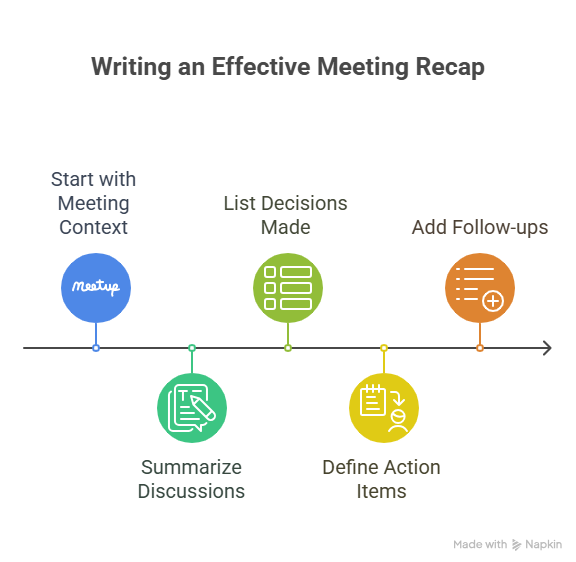
1. Start with the meeting context
Give readers a quick snapshot of the meeting. Include the meeting title, date, time, attendees, and the goal of the discussion. This information helps people remember why the call happened and who took part.
2. Summarize what the team discussed
Write a short summary of the main points. Stay focused on outcomes and key messages. Skip long explanations and side conversations. One or two sentences per topic usually works best.
Here’s an example: We reviewed the Q2 marketing results and spotted a drop in organic traffic. The team agreed to revisit keyword priorities for the next quarter.
3. List the decisions
Record every decision the group made using simple bullets. This keeps the recap easy to scan and helps the team confirm what they committed to during the meeting.
4. Add action items with owners and deadlines
State the task, the owner, and the due date. People need clear direction. If the team did not set a deadline, mark it as TBD and update it later. Action items form the bridge between the meeting and the work that follows.
For example, Sara will update the landing page copy by June 12.
5. Include follow-ups and open questions
Capture anything the team needs to revisit. These might be pending approvals, missing information, or tasks waiting on another group. This section prevents important details from getting lost.
Meeting recaps give people clarity. They show what happened, what matters, and what comes next without forcing anyone to sort through long notes.
6. Send the recap promptly
Get the meeting recap out within 24 hours while details are fresh. Send it to all attendees, plus anyone who was invited but couldn't make it.
Use a clear subject line like "Meeting Recap: [Topic] - [Date]" so people can find it later. Address the email to the full group and thank everyone for their time.
Include a simple greeting like "Thanks for joining today's call" before jumping into the recap. Keep the tone direct and focused on moving work forward.
If you need approval before sending, loop in your manager first. Once approved, hit send and move on to your next task.
You can also use an AI platform like Lindy to handle this automatically.
Tips to write a clear and useful meeting recap
A meeting recap works only when people can scan it quickly and act on it. These tips cover the full process, from preparation to follow-up:
- Prepare before the meeting: Decide how you’ll capture notes and where the recap will live. Having a simple template ready makes writing faster once the call ends.
- Take focused notes during the meeting: Write down decisions, action items, and open questions as they come up. You don’t need full transcripts. You need outcomes.
- Use AI to draft the recap faster: AI can turn rough notes or transcripts into a clean summary in seconds. It works best when you review and edit the output for accuracy and tone before sending.
- Send the recap soon after the meeting: Details fade quickly. Sending the recap shortly after the call keeps everyone aligned while the discussion is still fresh.
- Use a consistent structure every time: Stick to the same order: context, summary, decisions, action items, and follow-ups. Readers should always know where to look.
- Focus on outcomes, not everything said: A recap is not meeting minutes. Highlight decisions, takeaways, and next steps only.
- Make ownership and deadlines obvious: Every action item should clearly list who owns it and when it’s due. This avoids follow-up confusion later.
- Include what’s coming next: If there’s another meeting, decision checkpoint, or deadline, call it out so people know what to expect.
- Proofread and share with the right people: Double-check names, dates, and tasks before sending. Only include people who need the context or their own follow-ups.
- Store recaps in one place: Save recaps in a shared doc, folder, or project tool so anyone can find past decisions without digging through email.
Copy-and-paste meeting recap template
I prepared two templates that you can use for meetings. They keep the structure simple, so the team can read it fast and act on it without confusion. Here are the two templates to follow:
Action-oriented meeting recap – [Meeting name]
- Date: [Date]
- Attendees: [Names]
- Agenda: [Short summary of topics]
- Topics discussed: [include the main points that attendees spoke on the topics briefly]
- Summary: [Write a short overview of the main points and outcomes. Keep it to two to four sentences.]
- Decisions Made:
- [Decision 1]
- [Decision 2]
- [Decision 3]
- Action Items:
- [Name] will [Task] by [Deadline]
- [Name] will [Task] by [Deadline]
- Follow-ups and Open Questions:
- [Item that needs more input or approval]
- [Pending action from another team]
Alignment and visibility meeting recap – [Meeting name]
- Date: [Date]
- Attendees: [Names]
- Purpose of the meeting: [Why this meeting happened and what the team aimed to accomplish]
- Key takeaways:
- [Most important takeaway or insight]
- [Second key takeaway]
- [Third key takeaway, if needed]
- What changed or was confirmed:
- [Decision made or assumption validated]
- [Direction agreed on]
- [Update to an existing plan]
- Risks, blockers, or open concerns:
- [Risk or concern discussed]
- [Dependency or unresolved issue]
- Next steps:
- [Task or follow-up, owner, deadline]
- [Task or follow-up, owner, deadline]
- Related links or documents:
- [Doc, deck, or ticket link]
These templates give people a clear view of the meeting without long notes or confusion. Teams can skim them, understand them, and move to the next step without delays.
{{templates}}
Meeting recap example
Here is a meeting recap example you can use as references. Each one shows a clear structure that teams can scan and act on without confusion.
Meeting recap – June 5, 2025 | Weekly marketing sync
- Attendees: Priya, Alex, Nina, Sam
- Agenda: Review May campaign performance, discuss blog strategy, align on next steps
- Summary: We reviewed May's performance metrics. Blog traffic dipped 10 percent, but conversion rates improved. The team agreed to shift focus to SEO and long-form content. We discussed the newsletter redesign and agreed to delay it until Q4.
- Decisions Made:
- Focus upcoming content on long-form SEO articles
- Push newsletter redesign sprint to Q4
- Pause Twitter Ads for June
- Action Items:
- Nina will build the revised content calendar for June by June 7
- Sam will draft two long-form article outlines by June 10
- Alex will pause the newsletter sprint and notify the product team
- Priya will coordinate with the SEO vendor for new topic research
- Follow-ups:
- Awaiting CMS performance fix from DevOps
- Need keyword gap analysis from the SEO team next week
If your team runs frequent meetings, automation can remove the manual work from recaps. Tools like Lindy turn meeting notes into a structured recap, highlight decisions, and list action items with owners, making them consistent.
How to automatically write and send meeting recaps with AI tools
Automating the entire recap process with AI tools can remove the manual work and give your team clear summaries after every meeting. The setup takes only a few steps:
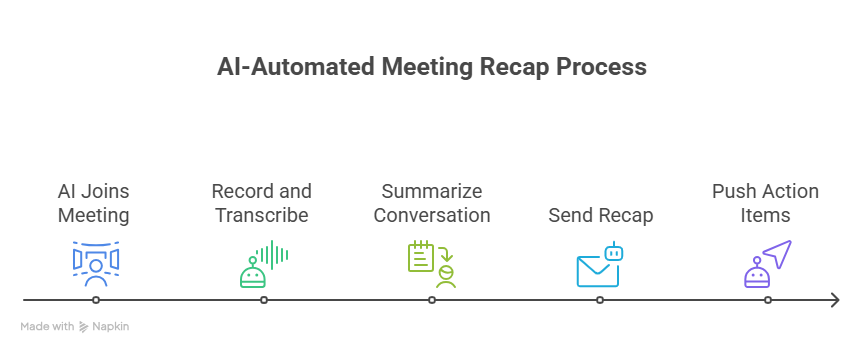
1. Let the AI tool join your meetings
Meeting recap generators like Lindy can join Zoom, Google Meet, or Microsoft Teams calls on your behalf and record them. It listens from the start of the meeting so it can capture the full conversation without any gaps.
2. Get real-time transcription
AI can transcribe the meeting as it happens. For example, Lindy meeting agents can separate speakers and record each part of the conversation. You can follow the discussion without taking notes because they capture everything for you.
3. Receive a structured meeting recap
Once the meeting ends, AI creates a clean summary. It highlights the key topics, the decisions, the action items, and the follow-ups. Using tools like Lindy keeps the structure consistent across meetings, so teams know where to find what they need.
4. Share the recap automatically
You can automate the process of sending recaps to your team through email or Slack. This removes the need to copy text or prepare recap emails after the meeting.
5. Sync action items to your workflow tools
Most AI tools, including Lindy, can also create tasks in Notion, Asana, Trello, or ClickUp. This helps the team move from decision to task without rewriting anything.
With more than 4,000+ app integrations, Lindy connects to your tech stacks and eases the process of meeting recaps.
Meeting recap vs meeting minutes: What’s the difference?
A meeting recap explains what the team discussed and what they plan to do next, while meeting minutes record the entire meeting in detail.
A recap focuses on outcomes, decisions, and next steps. Minutes capture the conversation step by step. Most teams use recaps for everyday work because they are easier to read and faster to act on. Both help teams stay aligned, but they support different needs.
Here is a simple comparison:
Choose a recap when you want fast alignment. Choose minutes when you need a complete record of what happened in the meeting.
Benefits of meeting recaps
Meeting recaps help teams work with clarity. They prevent confusion, reduce backtracking, and keep everyone focused on the same goals. Here are some important ones:
- Improves clarity and alignment: People leave the same meeting with different interpretations. A meeting recap gives everyone the same understanding of what the team discussed and what they agreed to do next.
- Drives accountability: Clear ownership removes confusion. When a recap lists tasks with names and deadlines, people know what they need to deliver and when they need to deliver it.
- Reduces repeat discussions: Teams waste time when no one remembers the decision from the last call. A recap captures the outcome so the team does not revisit the same conversation.
- Saves time and supports faster progress: People spend less time hunting for updates or asking the same questions. A recap gives them the information they need in one place so they can move to the next step without delays.
- Protects project context: Priorities shift, and people forget details. A recap records why decisions happened and what changed, which helps teams stay grounded even as work moves forward.
- Improves handoffs and onboarding: Anyone who missed the meeting can catch up quickly. A recap gives them the context they need without long notes or transcripts.
{{cta}}
Try Lindy to automate meeting recaps and other meeting tasks
Lindy lets you create AI agents for meeting recaps and other related tasks. These AI agents can understand natural language and speaker intent, creating accurate and detailed recaps of your meetings.
Here’s how Lindy eases meeting automation:
- Drag-and-drop workflow builder for non-coders: You don’t need any technical skills to build workflows with Lindy. It offers a drag-and-drop visual workflow builder.
- Create AI agents for your use cases: You can give them instructions in everyday language and automate repetitive tasks. For instance, create an assistant to find leads from websites and sources like People Data Labs. Create another agent that sends emails to each lead and schedules meetings with members of your sales team.
- 24/7 agent availability for async teams: Lindy agents can run 24/7, perfect for async workflows or round-the-clock coverage.
- Integrates with major apps: Lindy connects with your favorite tools like Airtable and Salesforce, keeping all your training data in one place.
- Update CRM fields without manual entry: Instead of just logging a transcript, you can set up Lindy to update CRM fields and fill in missing data in Salesforce and HubSpot without manual input.
- Supports tasks across different workflows: Lindy also handles website chat, lead generation, content creation, and more. You can create AI agents that help reduce manual work in training, content, and CRM updates.
- Affordability: Build your first few automations with Lindy’s free version and get up to 40 tasks. With the Pro plan, you can automate up to 1,500 tasks, which offers much more value than Lindy’s competitors.
Frequently asked questions
How to create a sales meeting recap using GPT?
You can create a sales meeting recap with GPT by giving it the full transcript or detailed notes. Ask it to extract goals, objections, decisions, next steps, and owner assignments. This gives you a clean summary without manual sorting.
How to write a meeting recap?
You can write a meeting recap by listing the meeting purpose, the main points discussed, the decisions, the action items, and the follow-ups. Keep each section short so people can read it quickly.
How to start a recap email?
You can start a recap email with a simple thank you and a direct summary sentence. Here’s an example: Thank you for joining the meeting today. Here is a short recap with the key points and next steps.
What are the key elements to include in a meeting recap?
Meeting date, attendees, main discussion points, decisions, action items with owners, follow-ups, and the next meeting date, if one exists, are some of the key elements to include in a meeting recap.
Does a meeting recap provide new insights or only a summary?
A standard meeting recap focuses on summarizing key points and action items, but you can include your own insights or suggestions if helpful for the team.
How to recap a phone conversation in an email?
You can recap a phone conversation in an email by opening with the purpose of the call and the person you spoke with. Summarize the key points, list the decisions, and state the next steps with deadlines if they exist.
How soon should you send a meeting recap?
You should send the meeting recap as soon as possible, ideally within an hour. The quick timing keeps the details accurate and the momentum strong.
What is the difference between meeting notes and a meeting recap?
Meeting notes record every detail of the conversation, while a meeting recap highlights the important points, decisions, and next steps in a short format.
Should you include meeting recordings or transcripts with a recap?
It's best to link meeting recordings or transcripts only when your team needs deeper context or if required for documentation. Always consider privacy and team preferences before sharing full recordings or transcripts.
How do you recap a recurring meeting without repeating everything?
You can recap a recurring meeting without repeating by focusing on what changed since the last meeting. Summarize new decisions, new blockers, and updated action items.
What tools integrate well with meeting recap automation?
Tools like Notion, Asana, Trello, ClickUp, Slack, Gmail, Outlook, HubSpot, and Salesforce integrate well with meeting recap automation. Lindy connects with all of these, so tasks and summaries stay organized.
How should you format a recap for different teams?
For a different team, you should match the format to the team. Executives need a short summary and clear decisions. Product and marketing teams need bullets and action items. Clients need a polished tone and clear next steps.
Can you automate recaps for one-on-one meetings?
Yes, you can automate recaps for one-on-one meetings much like group meetings. Just ensure you review the recap for sensitive information before sharing.
What if a meeting includes sensitive information?
If a meeting includes sensitive information, review the recap before you share it. Redact sensitive information or limit access when needed. Most tools, including Lindy, allow these controls so you can protect privacy.








Blog
Related Articles
%2520(1).png)
%20(1).png)
%20(1).png)
.png)
%2520(1).png)
The AI assistant that runs your work life
Lindy saves you two hours a day by proactively managing your inbox, meetings, and calendar, so you can focus on what actually matters.
