


Sales Workflow Automation 101: Complete Guide for 2026


I tested sales workflow automation across CRMs, outreach tools, and AI platforms to see which steps actually save time. Here's what sales teams should automate first and how to set it up in 2026.
What is sales workflow automation?
Sales workflow automation uses software to handle repetitive tasks, like data entry, lead routing, follow-up emails, and reminders. It helps your sales team's workflow stay on track, even on busy days.
For example, if your sales process lives in a playbook or shared doc, sales workflow automation turns it into a system that actually runs. Leads get qualified, assigned, followed up with, and logged automatically, without reps needing to remember each step.
Sales workflow automation is different from basic task automation. Task automation handles single actions, such as sending a confirmation email after a form fill. Sales workflow automation connects those actions across the funnel, so each step triggers the next at the right time.
Common stages in a sales workflow
The common stages in a sales workflow include:
- Lead research
- Outreach
- Qualification
- Demos
- Deal closing
- Onboarding
Each stage has a clear goal. When reps follow the same stages, sales workflow management is easier to track and improve.
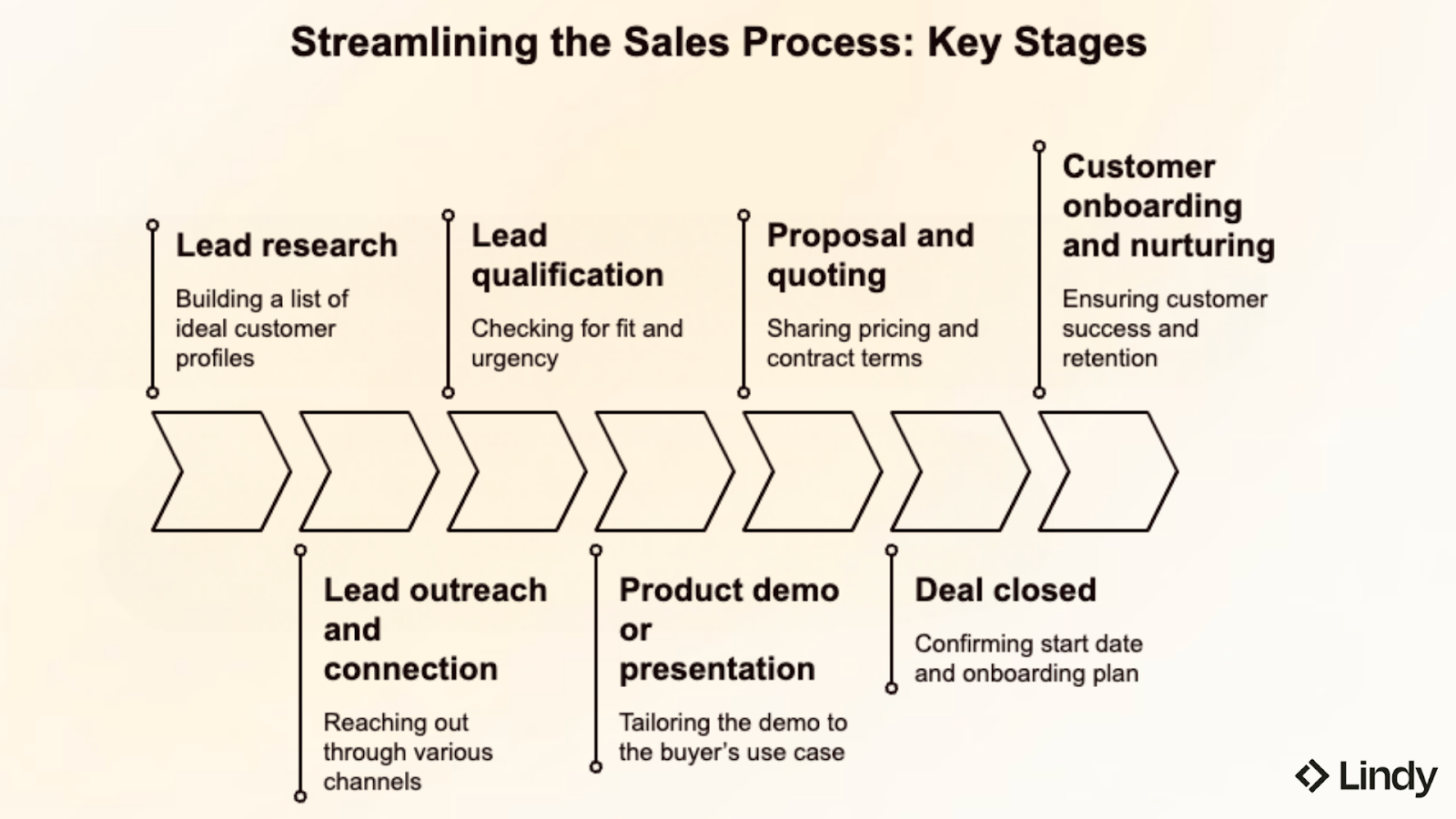
1. Lead research
Reps build a list of accounts and contacts that match the ideal customer profile. They check industry, company size, location, and job titles. They also look for buying signals, like new hiring, new funding, product launches, website visits, or intent data.
2. Lead outreach and connection
Reps reach out through email, cold calls, LinkedIn, or inbound requests like a demo form. Most teams use a short sequence, with a few touches over several days. Reps track what was sent, what the lead replied, and what to do next.
3. Lead qualification
When the lead responds, the rep checks if this is a good fit and if there is real urgency. Reps ask about the problem, who is involved, the timeline, the budget range, and what tools they use today. They also check if the lead has authority or needs to bring others in.
4. Product demo or presentation
The rep tailors the demo to the buyer’s use case. They show the parts of the product that solve the buyer’s problem and explain how it works in real life. They may share examples, workflows, or simple results that the buyer can expect. If the deal is technical, a sales engineer may join to answer deeper questions.
5. Proposal and quoting
The rep shares pricing, packaging, and contract terms. Buyers often ask for changes, like seat counts, billing terms, security reviews, or legal edits. Many teams also need internal approvals for discounts or special terms.
6. Deal closed
The rep marks the deal as closed won or closed lost. If it is won, the rep confirms the start date, plan, billing, and what the customer needs for onboarding. If it is lost, the rep captures the reason, like price, timing, missing features, or a competitor.
7. Customer onboarding and nurturing
After the sale, the account moves to onboarding or customer success. The team runs a kickoff call, sets success goals, and plans the first setup steps. They track product use, support training, and fix issues early. Over time, they manage renewals and look for expansion when the customer is seeing value.
What tasks can be automated with AI in a sales workflow?
AI can automate lead enrichment, scoring, follow-ups, meeting booking, CRM updates, proposal drafts, call summaries, and deal alerts. In many sales workflows, it also makes decisions based on CRM data, email replies, call notes, and buyer behavior.
Here are common tasks AI can handle in a sales team workflow:
- Lead enrichment and research: AI can pull company size, industry, tech stack, and key contacts. It can also fill missing CRM fields, so reps do not have to search across tabs.
- Lead scoring and prioritization: AI can score leads based on fit and intent. For example, it can boost a lead that visited pricing pages or booked a demo, and lower one that looks like a poor match.
- Automated follow-up emails and reminders: AI can draft follow-ups using the last thread and deal context. It can also remind reps when there is no reply, so leads do not go cold.
- Meeting scheduling and rescheduling: AI can share available time slots, confirm the meeting, and send calendar invites. If the buyer reschedules, it can suggest new times and update the invite.
- CRM updates and data entry: After calls or emails, AI can log the activity and update the deal stage. It can also capture basics like next step, timeline, and key stakeholders.
- Proposal generation and routing: AI can create a first draft of a proposal using your pricing rules and past templates. It can then route it to the right person for review, like finance or legal.
- Call summaries and notes: AI can summarize what the buyer said, list key needs, and note objections. It can also highlight action items, then save everything to the opportunity record.
- Deal risk detection and pipeline alerts: AI can spot deals that are stuck, like no activity for 10 days or a missing decision maker. It can alert reps and managers early, before the quarter ends.
Best ways to automate sales workflows
The best way to automate your process is to start with one or two high-friction steps, like lead routing, follow-up emails, or CRM updates. Once the team sees those working reliably, you can expand automation to other stages. This keeps your workflow simple and easier to improve.
Here are proven approaches that work in most sales teams:
- Automate handoffs, not just emails: A handoff is when a deal moves from one person or stage to another, such as from inbound lead to assigned rep, from qualified lead to demo, or from closed won to onboarding. Many deals stall during these transitions. Automate routing, stage updates, and internal notifications so nothing gets delayed or missed.
- Use AI for decisions, not only actions: AI can prioritize leads, suggest the next best step, and flag deals at risk based on CRM data, email replies, and call activity. Traditional rule-based automation only follows preset conditions, such as “if a form is submitted, send an email.”
- Trigger workflows based on buyer behavior: Start automation when a buyer takes action, such as filling out a form, replying to an email, booking a meeting, or visiting the pricing page. This keeps follow-ups timely and prevents deals from stalling.
- Keep humans in the loop for pricing and negotiation: Automate setup and routing, but require approval for discounts, contract changes, and special pricing. This protects margins and reduces costly mistakes in late-stage deals.
- Refine workflows using performance data: Track where deals slow down, where follow-ups drop, and which stages lose the most opportunities. Then adjust timing, routing, and triggers based on real results. Your automation tool should clearly show what is working and what is not.
{{templates}}
What workflow automation features should you look for in a sales tool?
The workflow automation features you should look for in a sales tool include CRM integration, AI scoring, event triggers, cross-tool workflows, easy setup, analytics, and approvals. These features help your sales workflow run with less manual work and cleaner data.
Key sales workflow automation features to compare:
Sales workflow tools commonly used by teams
The sales workflow tools commonly used by teams include CRMs, outreach tools, enablement platforms, meeting tools, CPQ systems, and analytics dashboards. Together, they support day-to-day operations and help teams run smoother workflows.
Here are the types of top sales workflow tools:
- CRM software for pipeline tracking: Stores accounts, contacts, deal stages, and activities. Many CRMs also support basic sales workflow automation, like tasks, reminders, and lead routing.
- Email and engagement tools for outreach automation: Runs sequences, templates, and follow-ups. This keeps the sales team workflow consistent, even when reps are handling many leads.
- Sales enablement platforms for content and context: Helps reps find the right decks, one-pagers, and case studies. Some tools also track which content is used and what works best.
- Meeting and presentation tools for demos: Supports scheduling, video calls, and demo planning. This reduces back and forth and helps deals move faster.
- CPQ tools for quoting and contracts: Manages pricing rules, quote creation, discount approvals, and contract steps. This is important in late-stage sales workflows.
- Analytics dashboards for forecasting: Pulls pipeline data to show forecasts, deal health, and stage conversion. This improves visibility for both reps and managers.
More AI platforms now connect these tools into one automation layer. That is where sales workflow automation becomes stronger, because work can move across tools instead of stopping at each handoff.
How sales workflow automation works (step-by-step)
A simple sales workflow automation example shows how tools and AI can run key steps in your sales workflow with little manual work. This is how sales workflow management becomes easier to scale.
Here is what an effective sales workflow automation can look like:
- A lead fills out your demo form: When someone submits your form, that action automatically triggers the workflow. You don’t need to manually check submissions or assign the lead.
- The system enriches and scores the lead: Your tool pulls in additional details from the form and external data sources, such as company size, industry, job title, and location. It then scores the lead based on your criteria and buyer signals, like pricing page visits or repeat site activity. This helps you prioritize serious buyers first.
- The lead is routed to the right rep: Based on rules you set, such as region, company size, industry, or round-robin assignment, the lead is automatically assigned to the correct salesperson. This prevents delays and removes confusion about ownership.
- A personalized follow-up is sent automatically: The system sends an email using the lead’s details and the page they came from. If the lead replies, the workflow updates the deal stage and sets the next task without manual input.
- Meetings are scheduled without back-and-forth: The lead chooses a time directly from the rep’s calendar. The calendar invite is sent automatically, and reminder emails go out before the meeting.
- Your CRM updates after each interaction: Emails, meetings, and notes are logged automatically in your CRM. You can even create follow-up tasks when needed. You don’t have to re-enter information in multiple tools.
- You get alerted if the deal stalls: If there is no activity for a set number of days, the system flags the deal. This gives you or your manager a chance to step in before the opportunity goes cold.
This is a practical sales automation process flow. It connects systems and keeps sales workflows moving, even when the team is busy.
Automate sales, CRM, and support by texting Lindy
Lindy is an AI assistant you can text to automate sales workflows, CRM updates, meeting follow-ups, and support tasks. It connects with tools like Gmail, Google Calendar, HubSpot, and Salesforce, so your process runs across apps without manual work.
Lindy helps automate your workflows with features like:
- AI Meeting Note Taker: Lindy joins meetings from Google Calendar. It records the conversation, creates transcripts, and writes structured notes in Google Docs. After the meeting, Lindy can send Slack or email summaries with action items and can even trigger follow-up workflows across apps like HubSpot and Gmail.
- Sales Coach: Lindy can provide custom coaching feedback, breaking down conversations using the MEDDPICC framework to identify key deal factors like decision criteria, objections, and pain points.
- Update CRM fields without manual entry: Instead of just logging a transcript, you can set up Lindy to update CRM fields and fill in missing data in Salesforce and HubSpot without manual input.
- Send follow-up emails and keep everyone in sync: Lindy can send follow-up emails, schedule meetings, and keep everyone in the loop by triggering notifications in Slack.
- Lead enrichment: You can configure Lindy to use a prospecting API (People Data Labs) to research prospects and to provide sales teams with richer insights before outreach.
- Automated sales outreach: Lindy can run multi-touch email campaigns, follow up on leads, and write follow-up replies using open rates, clicks, and prior messages.
Try Lindy free and automate your first workflow.
{{cta}}
FAQs
1. What is sales workflow automation?
Sales workflow automation uses software to run sales steps for you automatically. It can assign leads, send follow-ups, book meetings, and update your CRM. The goal of sales workflow automation is to cut busywork and keep every deal moving in the same clear steps.
2. What tasks can be automated with AI in a sales workflow?
The tasks that can be automated with AI in a sales workflow include lead research, lead scoring, follow-up drafts, meeting booking, CRM updates, call notes, and deal risk alerts. These AI tasks help sales workflows stay active, so reps spend less time on admin and more time talking to buyers.
3. What is the difference between sales workflow and sales process automation?
A sales workflow defines the steps your team follows from lead to close. Sales process automation uses software to run those steps automatically. Sales workflow automation combines both concepts in daily operations.
4. What are the best tools to automate sales workflows?
The best tools to automate sales workflows connect your CRM, email, and calendar, then run the next step automatically. Tools like Lindy, Zapier, Make, and HubSpot are strong options, depending on your team’s setup.








Blog
Related Articles
%20(1).png)
%20(1).png)

%2520(1).png)
The AI assistant that runs your work life
Lindy saves you two hours a day by proactively managing your inbox, meetings, and calendar, so you can focus on what actually matters.
